Umamusume (Uma Musume) Tier List Maker
All 62 playable Umamusume in Umamusume: Pretty Derby, each with its official in-game picture, ready to rank.
Items to rank
62 Agnes Tachyon
 Air Groove
 Air Messiah
 Almond Eye
 Biko Pegasus
 Biwa Hayahide
 Chrono Genesis
 Curren Bouquetd'or
 Daiichi Ruby
 Daiwa Scarlet
 Daring Heart
 Eishin Flash
 El Condor Pasa
 Fine Motion
 Gold City
 Gold Ship
 Grass Wonder
 Haru Urara
 Hishi Akebono
 Ikuno Dictus
 Inari One
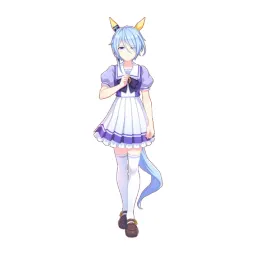 K.S.Miracle
 Kitasan Black
 Loves Only You
 Manhattan Cafe
 Maruzensky
 Marvelous Sunday
 Matikanefukukitaru
 Meisho Doto
 Mejiro Ardan
 Mejiro Bright
 Mejiro Dober
 Mejiro McQueen
 Mejiro Ramonu
 Mihono Bourbon
 Nakayama Festa
 Neo Universe
 Nice Nature
 Oguri Cap
 Phalaenopsis
 Red Desire
 Rhein Kraft
 Rice Shower
 Satono Diamond
 Seeking the Pearl
 Seiun Sky
 Silence Suzuka
 Sirius Symboli
 Smart Falcon
 Special Week
 Still in Love
 Super Creek
 Sweep Tosho
 Tamamo Cross
 Tokai Teio
 Tosen Jordan
 Tsurumaru Tsuyoshi
 Verxina
 Vodka
Vodka Yaeno Muteki
 Yukino Bijin
 Zenno Rob Roy
Drag the 62 items below into the tiers that match how you rank them. Rename any row, change its colour, add your own pictures, then save the chart as an image.










































How to rank Umamusume (Uma Musume)
The quickest way through 62 items is to make two passes. On the first pass place only the ones you are certain about, such as Agnes Tachyon or Special Week. On the second pass compare what is left against the items already in a tier, which is far easier than ranking from an empty board.
What the tiers mean here
S tier is normally the picks that win games on their own, A the reliable ones, and the bottom rows the picks that need a lot of work to pay off. Favourites count too, so if Agnes Tachyon is your main it can sit in S whatever anyone else says.
About this set
There are 62 items here in the Gacha Games section, each with its own picture. taken from the game's own art and its community wiki. You can edit the set freely, so add what is missing, drop what you do not want, and the chart is yours.
Questions about this tier list
How many items are in the Umamusume (Uma Musume) tier list?
Can I add something that is missing from Umamusume (Uma Musume)?
How do I share my Umamusume (Uma Musume) ranking?
Ready to make a tier list?
Scroll back up, add your items, drag them into tiers and download the image. No sign-up, and nothing you make is stored on our servers.